Google Business Profile for Florists: A Complete Setup Guide
Nov 02, 2026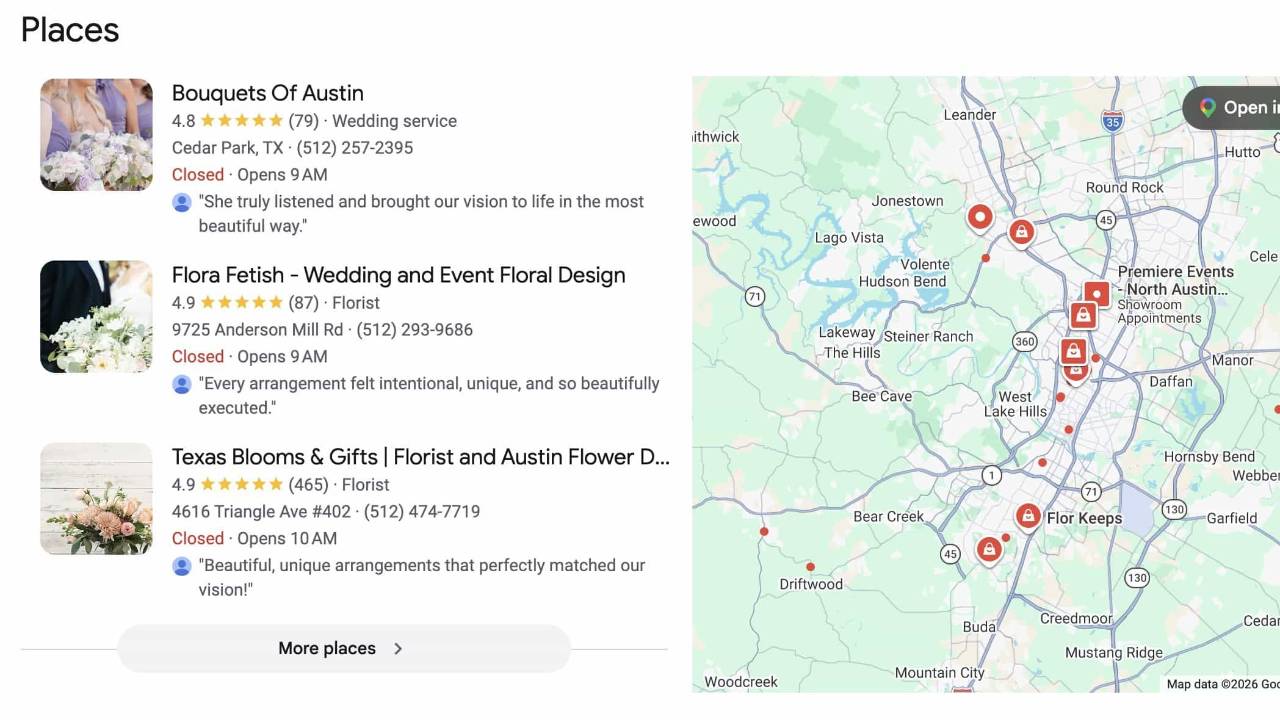
The value of a Google Business Profile
This article covers the role that a properly configured and actively updated Google Business Profile (GBP) plays in getting your business found on Google Search and Google Maps, and what it takes to keep it there. An accurate and actively updated GBP works alongside everything else that builds your brand's visibility, authority and relevancy: an SEO-optimized website, published content, directory listings, your social accounts and quality backlinks from relevant sources such as guest posts, features and interviews. Claiming and configuring a GBP is an important step covered in our comprehensive guide to starting a floristry business.
Where people search
Within the Google ecosystem, a customer typically searches in 2 places. Google Search (Google.com), which generates a dynamically structured page of results, formatted into sections that group result types according to the phrasing of the search query. The results page has evolved beyond a simple list of websites sorted by ranking. Often, groups of results appear on the page in these sections above the traditional list of ranking websites. Inclusion in some of these sections is governed by different criteria than organic ranking; the Places section, for instance, runs on local factors rather than the signals that rank websites. The second way to search would be Google Maps, which returns local business results - your Google Business Profile.
How query phrasing affects results
When searching on Google.com, the various sections of results that may be displayed, and their ordering on the page, is determined dynamically depending on how the customer's search query is structured. A question ("who is the best wedding florist in Austin TX") often returns an additional AI Overview section and a Discussions section. A statement ("wedding florists in Austin TX") tends to include a Places section near the top of the page results, which are local results sourced from Google Business Profiles.
Regardless of which type of additional results sections are presented with a given query, they almost always are displayed above the traditional list of ranked websites, which are the organic search results. An active GBP can therefore put your business higher on the page than sites that rank above yours in the organic results.

How types of search results are sourced
On Google.com
| Section | Typically drawn from |
|---|---|
| AI Overview | Web pages and other Google sources, including your website |
| Sponsored Results | Google Ads, bought pay-per-click |
| Places (Local results) | Google Business Profiles |
| Discussions | Reddit, forums and similar sources |
| Organic results | Websites and other web properties, ranked |
In Google Maps
| What is returned | Typically drawn from |
|---|---|
| Business listings | Google Business Profiles and related local data |
Most search result sections draw from many sources on the web to determine inclusion and ranking for any particular search query. The results displayed in Places and Google Maps are built around Google Business Profiles.
How Google ranks local results
Google states that local results are based primarily on the following three elements:
Relevance: how well your GBP matches what somebody searched for.
Distance: proximity of your business to the searcher's known location.
Prominence: the authority Google has accumulated about your business from signals across the web; chiefly links, mentions and reviews.
Google states plainly that more reviews and positive ratings can help your local ranking. A review is the written comment a customer leaves along with a star selection. Your rating is the average of those selections, shown as a number on a scale up to 5.0.
Relevance is the part you control directly and immediately, and it comes from a complete, accurate, actively updated GBP.
Prominence you can continually build over time by way of quality reviews and through social media mentions, press features and backlinks from industry associates like venues, photographers, fellow designers.
Distance you cannot control.
Claim your GBP. Fill it out completely and accurately. Keep your business details current. Request and respond to all reviews. Regularly use Posts to keep customers informed of time-sensitive updates. Use the GBP as a living local listing, not a one-time setup.
Does your business qualify
Most floristry businesses qualify for a GBP. Google's rule is that a business must make in-person contact with customers during its stated hours, and it does not require that contact to occur at your stated business address. For an event florist, that contact happens at the venue or delivery site.
Google excludes online-only businesses, including anything listed at a P.O. box or remote mailbox. A floral designer who ships dried flowers and never meets a client does not qualify; a florist who designs florals at a wedding venue does. A converted garage with a cooler in the corner and nobody walking in off the street is eligible. Your address verifies you, then gets hidden.
Google's eligibility guidelines
Setting up your GBP
Set this up on a computer rather than a phone. Verification happens after you submit and takes time, so start before you need the GBP live.
Sign in with the proper Google account
Decide this before anything else. A Google account is required, the GBP attaches to whichever account creates it, and changing that later means requesting an ownership transfer. Use an account that belongs to the business and that you control alone: not a shared household login, not a former employee's, not one tied to an email you might lose.
Claim an existing profile, or create a new one
Go to Business Profile Manager and select Manage now. Before you build anything, search your own business name plus your city in an incognito window. One of three things is true.
Nothing exists. Create it and carry on.
An unclaimed GBP exists. Very common, because Google generates unclaimed profiles for businesses it finds information about. Claim that one rather than creating a second, which would put you in violation. The old GBP often carries reviews you would otherwise abandon.
Somebody else claimed it. Use the request access flow and wait out the response window. Tedious, and better than starting over.
Business name
Your business name and nothing more. Adding descriptive terms, or keyword stuffing, as in "Wild Fern Floral | Austin Wedding Florist", is against the rules: Google's guidelines require you to "represent your business as it's consistently represented and recognized in the real world across signage, stationery, and other branding," and Google reserves the right to suspend profiles that violate them.
Primary category
Google asks for this on the first screen alongside your business name. Type into the field and take what autocomplete offers; the options change without notice, so treat no category name as permanent. Most florists will choose Florist. Add secondary categories that genuinely apply, such as Flower delivery if you deliver.
Path afterwards: Edit profile > Business information > Category.
How your address gets handled
What determines how your GBP is displayed to customers are the subsequent questions, which declare whether you have a physical storefront customers can visit.


A store would be a physical location that customers can visit, with permanent signage and a business representative present during posted hours. A service area is the geographical region that you are willing to provide services within, shown on your GBP rather than a physical address.
| Location customers can visit | Deliveries or visits | What you get |
|---|---|---|
| Yes | Yes | Address shown, staffed hours shown, plus a service area |
| Yes | No | Address shown, no service area |
| No | Yes | Address hidden, service area shown. Many wedding and event florists land here. |
Entering and hiding your address
During setup, you will enter a business address either way. Google verifies against a real physical location and does not publish it when you answer No to Do you want to add a location customers can visit?
- No P.O. box, mailbox rental or virtual office.
- One GBP only covering your entire service area. Not one per town. Duplicates are a violation of Google's guidelines.
- Remove it from public display under Edit profile > Location.

Setting your service areas
Path: Edit profile > Location > Service area > Edit. Up to 20 areas, by city, postal code or named area. No radius option; Google removed it. Keep the outer boundary within about 2 hours driving of your base. Approved edits take up to 48 hours to appear.

Phone, website and chat
Add a phone number you actually answer during the hours you posted. The GBP also offers chat, which routes customer messages to you by SMS. Only enable it if you will answer it.
Verifying the GBP
Verification is required before your GBP is eligible to appear. Google may offer different verification methods, but video verification is common. For video, record one continuous, unedited recording showing 3 things: that the location is real and matches what you entered, that you have authority over the business, and that the business operates as described. For a florist that usually means showing the cooler, the buckets, the workbench, the vehicle and the tools.
Once verified, add a second account as an owner under Business Profile settings > People and access. If you lose the original account, a second owner is the difference between a 5 minute fix and the request-access process above. Add your business partner, or a second account of your own.
Business hours
Retail florists should post storefront hours. Service-area and hybrid florists should post the hours they are actually reachable by phone, email or appointment, even without walk-in hours. Add holiday hours ahead of Valentine's Day and Mother's Day, since those dates can materially affect sales.
Description
750 characters. Google truncates the display without warning, so put the important information first. What you include beyond that will vary depending on whether you are a retail, commercial or event florist. Here is a sample of what you might include as a wedding and event florist.
- 1Front-load what you are and where
Business type, city, then specialty, in the first sentence.
- 2Name your towns in prose
Service areas live in a separate field that is not readable as sentences. Writing "serving Austin, Dripping Springs and Wimberley" puts those towns somewhere a reader and a machine can both use them.
- 3Name two or three venues you work regularly
Venue names are terms couples search for. Present a few venues that you have an actual history of designing at regularly.
- 4Give the year you started
"Founded in 2016" costs 16 characters and tells a customer something an adjective cannot.
- 5Accurately name details when describing methods
Foam-free, pin frogs, oshun pouches, armatures. Specific technique language separates you from every listing that says "beautiful custom arrangements."
Keep the first sentence informational. Vague, generic language (my love for flowers, passionate about blooms and similar phrases) tells a customer nothing they can act on, and uses characters you could spend describing the work.
Magnolia Floral Co is a wedding and event florist in Austin, Texas, serving Austin, Dripping Springs and Wimberley. Founded in 2016, we specialize in artful, garden-style design built with sustainable, foam-free mechanics.
We design ceremony installations, arbor and arch florals, bridal bouquets, boutonnieres, reception centerpieces and large-scale hanging work. We are regular vendors at Camp Lucy, Prospect House and Barr Mansion, and install at ranch venues and private residences across the Hill Country.
We build with chicken wire, pin frogs, water tubes and welded armatures rather than single-use floral foam, sourcing seasonally from Texas growers. We are a full-service event studio and do not offer daily delivery or walk-in retail.
Photographs
During setup, Google asks for a storefront photo and then for photos of your store. Both screens have a Skip button, and you can add or change photographs at any time afterwards under Edit profile > Photos.
If you have a shop with signage, photograph it straight on in daylight. If you are a studio florist, skip the storefront step. Instead you can add photos within your profile settings, including a cover photo, your logo and images of your studio space.
GBP profile settings
Once your GBP is established and verified, this is where you manage it and keep it updated.

From here you can edit your business information, including hours, location and service areas, respond to reviews, add photos, add products and keep your profile active and engaging by adding posts.
Posts
Posts are how you keep the profile fresh. There are three types, and any of them can be scheduled rather than published immediately.
An Update takes photographs and a description with a call-to-action button: announce an upcoming event, or send customers to a blog post about a recent wedding design.
An Offer takes a start and end date and time, a phrase summarizing the limited-time offer, and can include a coupon code and a link to redeem it.
An Event takes dates and times and a call-to-action button: a weekend flower market pop-up with a giveaway signup.
Getting Google reviews
The common problem is not a bad rating. It is a thin one: a handful of reviews, most of them old. Start the day you are verified rather than waiting for the next event, and send a request to every client from the last 12 months you parted with on good terms.
The system: ask soon enough that the work is still vivid, allowing for the fact that a couple may be away for a week or 2 after the wedding. Send a thoughtful email thanking the client for trusting you and kindly requesting a review, with a direct link to your GBP. Send it to every client, not only the ones you know were delighted, and offer nothing in return for it. Mention that photographs of the work would be welcome if they care to post any.
Review count and rating feed prominence, one of the three factors behind local ranking, so more reviews and better ratings help your position in Places and in Google Maps. Reply to every review, and make the reply specific enough to be worth reading. "Thank you so much!" carries less information for a future customer than "Thank you, Sarah. The garden roses in that arbor were a favorite of ours all season".
Evidence of the importance of reviews can be seen: perform a Google.com search for florists in your own town and look at the business listings returned in the Places section. Google tends to insert a snippet from a customer review in the results. Google therefore considers the text of reviews, not just the overall rating, plus what a client writes about you can end up in front of the next person searching.
Filter buttons appear above local results, in the Maps App and on desktop search alike: Top rated, 50+ reviews, Open now and on some queries Small business. Tapping one changes which businesses are shown.
The 50+ button gives you a number to work toward. For a floral studio designing 20 weddings per year, asking every couple reaches 50 in just under 3 years.
Review practices Google prohibits
- Incentives. Payment, discounts or free goods offered in exchange for a review, or for revising or removing a negative one.
- Selective solicitation. Review gating: discouraging negative reviews, or soliciting only the positive ones.
- Conflict of interest. Reviews from current or former employees, contractors, competitors or family.
- Content that is not a genuine experience, or posted from multiple accounts by one person.
Consequences run from removing the reviews to unpublishing your ratings.
These come straight from Google's Prohibited and restricted content policy, which is worth reading in full. In the United States the FTC also regulates consumer reviews, and its rule carries civil penalties. That is a second regime on top of Google's, and a business offering a discount for a review is exposed under both.
Keeping the GBP current
Setting up the GBP is the easy part, but keeping the profile active and updated requires implementation into your regular digital content routine.
The habit worth building is simple: keep your GBP up to date with relevant imagery and posts regarding your business operations and work. Since you are already producing such content for social media and your website portfolio, it is merely a matter of adding your GBP as one additional endpoint.
Photos should be your own; avoid stock or AI-generated content. If permitted to share a photographer's coverage of your work, be sure to give credit. Google's requirement is that a photo be in focus, well lit, with no significant alterations or excessive filters, because the image should represent reality.
Posts are what keep the profile active. Use them to keep customers informed about business happenings: recent work, upcoming and past events, holiday hours and deadlines, seasonal availability, sales and collaborations.
Ask for reviews, then reply to the ones you get.
Photo requirements: photo requirements
What your GBP does not replace
Keep your details identical everywhere. Your business name, address, phone number and website should match across your own site, your GBP and any directory that lists you. When those details disagree, Google has a harder time recognizing all of those listings as the same business.
Posts are not website pages. A post is a short-lived update. You still need real pages on your website for wedding work, event floral design, delivery and the cities you serve.
A 10 minute monthly routine
- Upload 4 or 5 new photographs of real work.
- Publish 2 to 4 posts throughout each month.
- Reply to every new review being genuine and specific.
- Update store hours when necessary, looking ahead each month in preparation for holidays or heavy event weeks where store hours need to be modified.
- Following website updates or rebuilds confirm that the GBP phone number and website links still work.
- Check the dashboard for any notices from Google about your GBP.
- Open the Performance tab in your GBP dashboard, which contains useful information about how customers discover your business, including the search terms they used.
Avoiding suspension
Violations that can lead to suspension:
- Keywords in the business name.
- A P.O. box, mailbox rental or virtual office address.
- A residential address left public on a service-area business.
- Duplicate GBPs, such as creating a separate GBP for each city you serve.
- Photographs that do not represent reality; avoid stock images and AI-generated content.
- Incentivized reviews, or soliciting only your happy clients.
- Posted hours nobody is available to honor.
To appeal a suspended or restricted GBP, you will likely need to submit documentation as evidence, which may include:
- Business registration or license showing the business name and address matching the GBP. A business license or tax certificate works.
- A utility bill. For a home studio: if both business name and address do not match, additional supporting evidence may be required.
Check Google's documentation directly
This guide is based on Google guidelines as of August, 2026. Google revises this documentation continuously and URLs may change.